
Browse articles
- Getting started
- Start your first project
- Model your project
- Critical path and automatic dates
- Read and rebalance the swimlanes
- Get oriented on the schedule
- Going further
- Give overhead a home with admin projects
- Structure large projects
- Baselines and versions
- Change Gantt bar colours
- Set a revenue target on the schedule
- Getting started
- How Monument models finance
- Revenue from resourcing
- Fixed fees
- Budgeting costs
- Recording expenses
- Recording revenue entries
- Going further
- Formula based pricing and construction cost
- Recurring and periodic fees
- Revenue from expenses
- Modifiers: contingencies and discounts
- Progressive billing
- Pricing templates
- Operational expenses
- Getting started
- Read your Dashboard
- Build a custom report
- Edit a saved report
- Filter a report
- Formula columns
- Freeze a report into a snapshot
- Reports on a project
- Definitions: how each figure is worked out
- Going further
- Time-Series Columns
- Organise your work with tags
- Break reports and accounting down by office
- Control access to business finances
- Control access to rates
- Control who can create projects
- Control project administration
- Control staff and team management
- Control expenses and claims
- Control report definition editing
- Control access to contacts
- Give full project control with Owner
- Manage project work without changing money
- Let project members edit tasks safely
- Share a project safely with Viewer
- Let a team lead coordinate shared work
- Share teammate profiles without management access
- Keep team members focused on their own work
Give overhead a home with admin projects
Create a non-billable admin project for studio overhead, then log time against it exactly like a client task, without it ever touching an invoice.
What you'll achieve
Give internal, non-billable work its own home so overhead time gets tracked honestly instead of vanishing or leaking into client costs.
You'll end up with: A non-billable admin project that collects internal time honestly and never touches a client billing workflow.
Before you start
Overhead is real work, and it needs somewhere to go
A practice runs on more than client fees. Someone answers the phones, chases an overdue invoice, drafts marketing copy, sits through a training session, none of that is billable, but all of it is real hours out of someone's week. If those hours have nowhere to land, they either vanish off timesheets entirely, or worse, get smeared onto a client project and quietly inflate its cost. An admin project exists so overhead has an honest home, kept deliberately apart from anything you'd bill a client for.
We'll set one up at Northlight Architects for general practice administration, then log an hour of overhead against it.
What makes an admin project different
A client project like Riverside Apartments carries a client, dates, a fee, and an invoicing trail. An admin project deliberately has none of that. It never carries a fee, so it can never appear as revenue and has no Billing tab at all, there's simply nothing on it to bill anyone for. What it does carry is time: people log hours against it exactly the way they'd log against a client task, and those hours flow straight into utilisation reporting.
An admin project isn't just for internal admin either. Pro bono commissions, competition entries, and speculative bids fit the same shape: real hours worth tracking, with revenue that reads zero by design rather than by accident.
Create it from its own tab
Admin projects live behind a separate tab on the Projects page, so they never clutter the list of actual client work.
- 1
On the Projects page, open the Admin tab.
- 2
Click New Admin Project.
- 3
Notice the form is short, no client field, no dates, since nothing here ever gets billed. Give it a code and a name, Practice Administration, and click Create Admin Project.
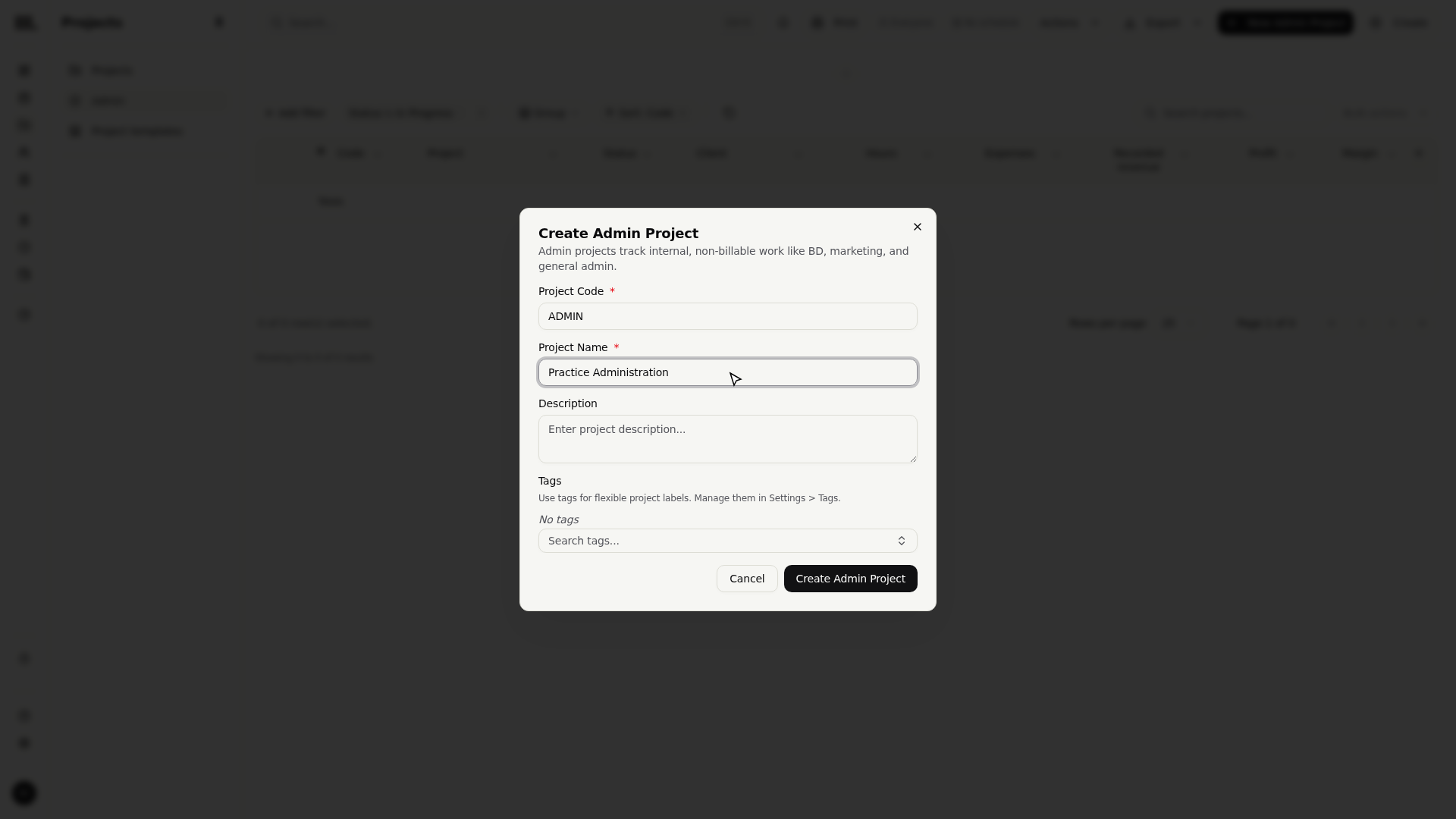
Monument drops you straight into the new project. Sweep across its tabs and you'll notice what's missing: no Billing tab, no financials of any kind. That absence is the entire feature, not an oversight, an admin project exists purely to absorb internal time.
Log time against it like any other task
From the Time page, an admin project behaves exactly like a client task on your timesheet.
- 1
Open the Time page and expand the Admin heading in the work list on the right.
- 2
Drag Practice Administration onto a day, the same drag you'd use for a client task.
- 3
Add a note on what the time covered and click Log Time.
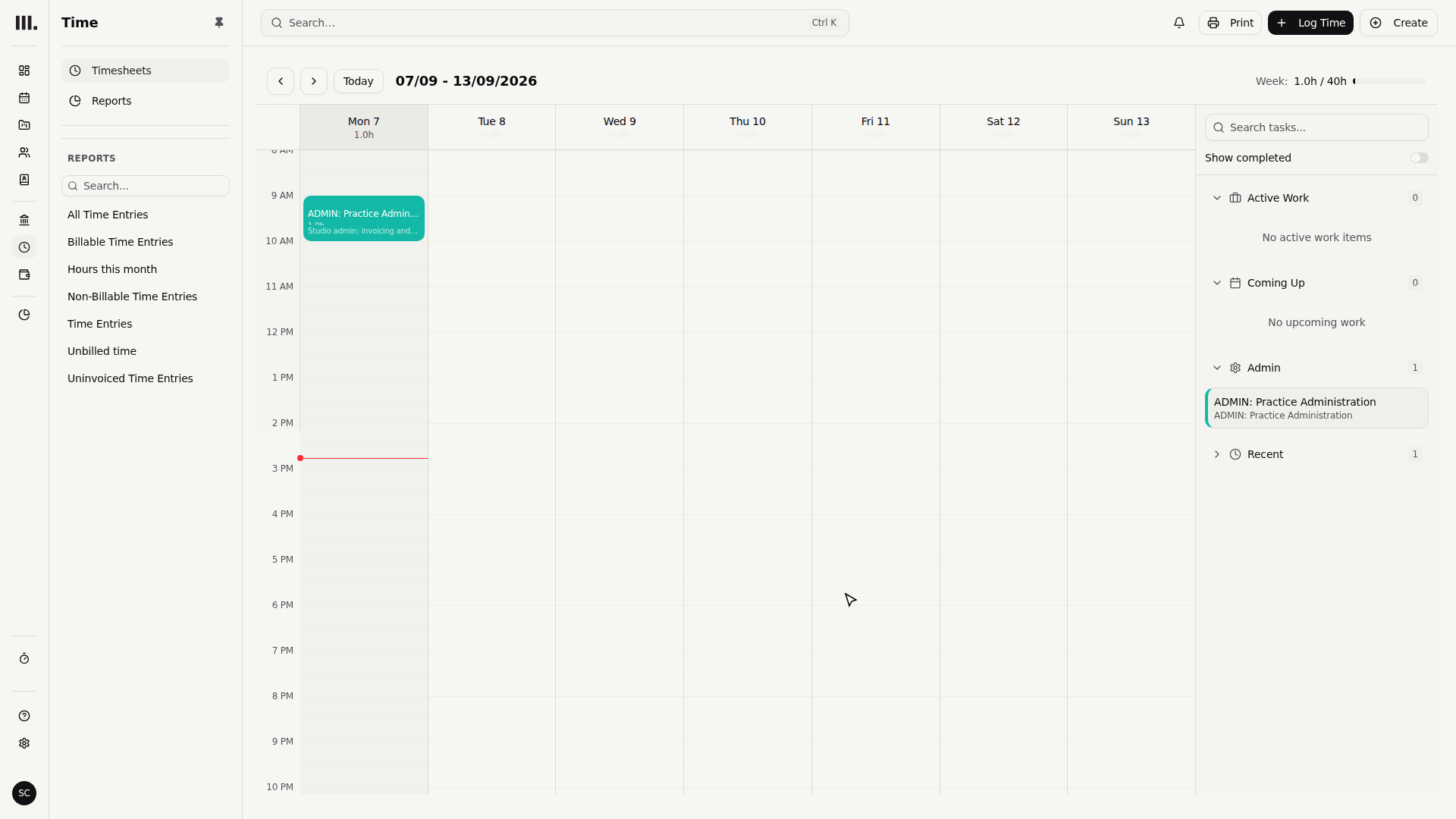
That hour now counts toward utilisation, so "where did the week actually go" has a real answer instead of a gap, but it will never surface on a client invoice.
Troubleshooting
- Can't find the admin project on the timesheet? It lives under the Admin heading in the work list, which starts collapsed. Expand it.
- No Billing tab on this project? That's correct for an admin project by design. If you actually need to bill for this work, it belongs as a client project instead.
- The create form is missing a client and dates? Also correct, the Admin tab deliberately opens the slim form. Switch to the regular Projects tab for billable work.
- Admin time isn't showing up in a revenue figure. It never will, admin projects generate no revenue by design. Look at time and utilisation reports for overhead, not revenue reports.
Where this fits next
With overhead captured properly, your timesheet tells the whole story. Keep logging time on the calendar for client work so client and admin hours both end up exactly where they belong.
Related articles
Search Monument help
Search help articles and open a result.