
Browse articles
- Getting started
- How Monument models finance
- Revenue from resourcing
- Fixed fees
- Budgeting costs
- Recording expenses
- Recording revenue entries
- Going further
- Formula based pricing and construction cost
- Recurring and periodic fees
- Revenue from expenses
- Modifiers: contingencies and discounts
- Progressive billing
- Pricing templates
- Operational expenses
- Control access to business finances
- Control access to rates
- Control who can create projects
- Control project administration
- Control staff and team management
- Control expenses and claims
- Control report definition editing
- Control access to contacts
- Give full project control with Owner
- Manage project work without changing money
- Let project members edit tasks safely
- Share a project safely with Viewer
- Let a team lead coordinate shared work
- Share teammate profiles without management access
- Keep team members focused on their own work
Formula based pricing and construction cost
Price a stage the way a lot of architecture fees actually work: as a percentage of the estimated construction cost, so the fee moves whenever that estimate does.
What you'll achieve
Make a stage's fee calculate itself from a driver, so it updates whenever the driver changes.
You'll end up with: A revenue item that derives from a stored driver and recalculates the instant that driver changes.
Before you start
A fixed fee works when a number is genuinely fixed. Most of Concept Design's fee is not: at the early stages of a commission, quoting a percentage of the estimated construction cost is the standard way architects price the work, precisely because that estimate is still moving. A quantity surveyor revises the number after a cost check, the client's budget shifts, or the scope grows during Design Development, and every time it does, a fee quoted as a flat dollar figure needs someone to remember to go back and re-quote it. Miss that step once and you're invoicing off a number the project outgrew months ago.
Formula-based pricing removes the "someone has to remember" part. Once the fee is written as a percentage of a stored construction cost, updating the estimate updates the fee. Nobody re-quotes anything.
We'll price the Concept Design stage of Riverside Apartments as ten percent of construction cost, the same arrangement you'd set up for a real commission priced this way.
Store the number the fee depends on, separately from the fee itself
A formula needs something concrete to point at, so pricing this way is really two items working together rather than one:
- A driver: the construction cost, entered as its own revenue item purely so the rest of the model has something to reference. It's hidden, because a driver isn't money the practice earns, it's an input, the same way a cost estimate itself is never a line on an invoice.
- A formula item: the actual fee, written as an expression that reads the driver,
{revenue.construction_cost} * 0.1.
Before either of those goes in, hide the hourly revenue the stage started with. Otherwise you'd end up with three things counting toward the total instead of one.
Once the driver and the formula are linked, the fee stops being a number anyone has to remember to update. It's a calculation that happens to look like a number, and it moves the instant its input does, which is exactly what you want when the input is an estimate that's still being refined.
Build it
- 1
Open the Concept Design stage and its Revenue breakdown.
- 2
Hide the default hourly revenue so it stops counting toward the total.
- 3
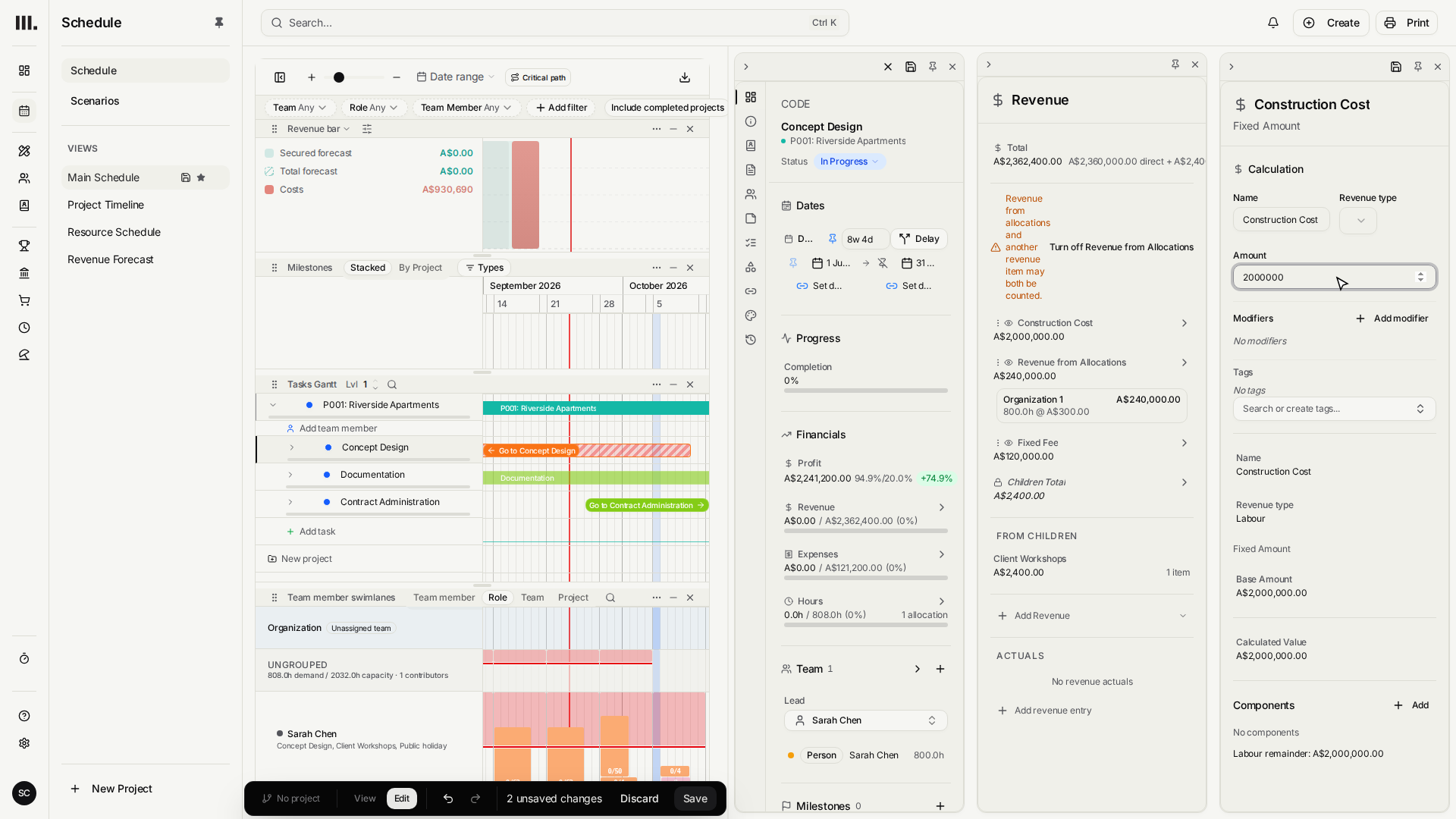
Add a Fixed Amount item, name it Construction Cost, and set it to two million dollars.
- 4
Hide it too. It informs the fee, but it isn't itself revenue you bill.
- 5
Add a Formula item and enter {revenue.construction_cost} * 0.1.
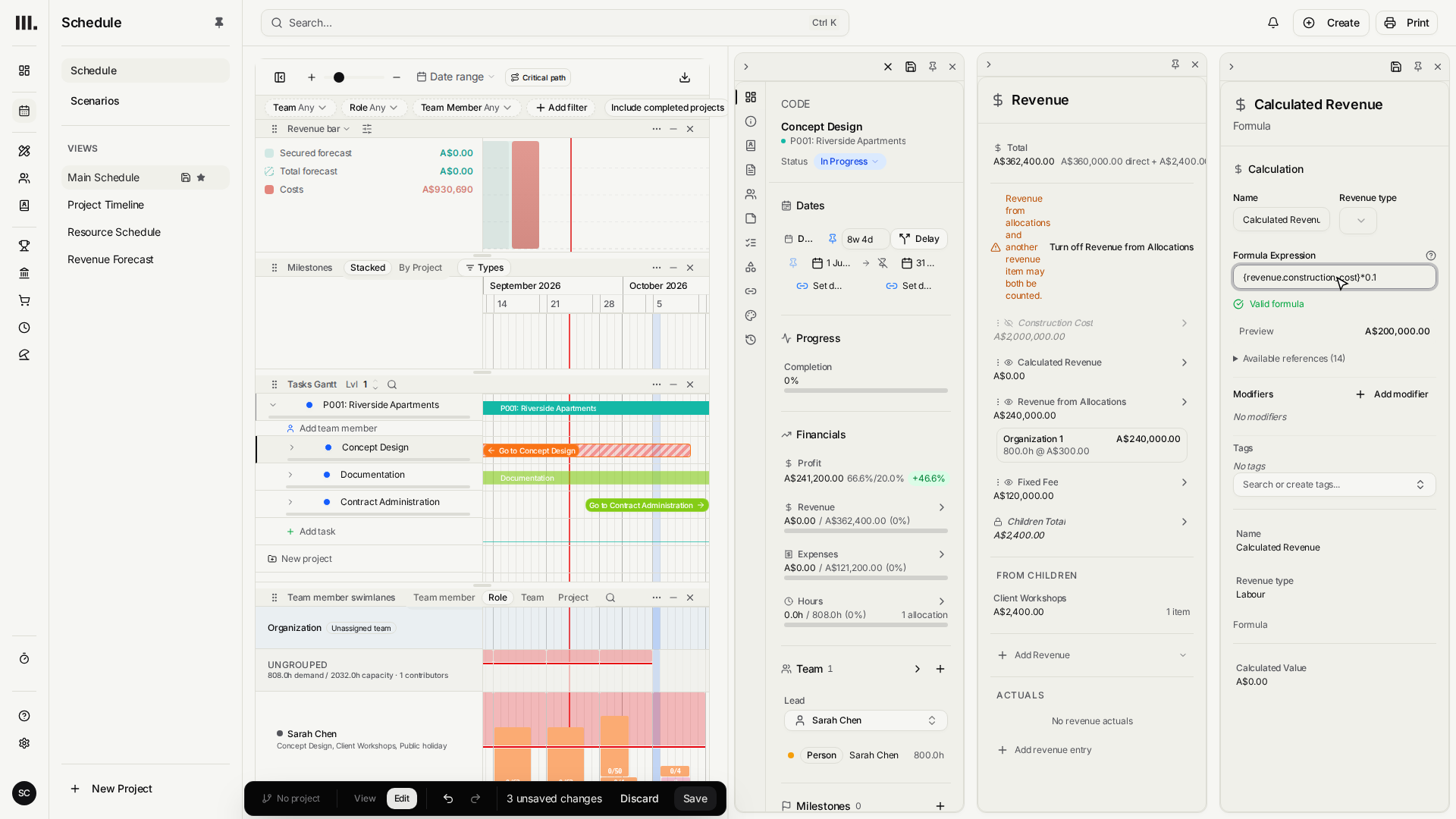
Monument turns each item's name into a reference slug automatically: "Construction Cost" becomes construction_cost in the revenue namespace, so the formula reads {revenue.construction_cost}. If you're unsure what a name turned into, the references list inside the formula editor shows every slug you can point at.
The point of doing it this way
This is the moment that plays out on every real project: the quantity surveyor comes back with a revised estimate, or the client adds scope and the budget grows. Push the Construction Cost up to three million and the formula fee jumps to three hundred thousand on its own. Drop it to one million and the fee falls to one hundred thousand, still without touching the formula. Nobody has to remember to go back and re-quote the client, because the fee was never really a number, it was always a relationship, and updating one input keeps every stage priced off it honest at once.
Once a stage's pricing is just items and a formula, the whole arrangement is reusable. Save it as a template and every future project starts with your standard construction-cost pricing already wired in, see pricing templates.
Troubleshooting
- The formula shows an error or a stubborn zero. The reference has to match the driver's slug exactly, and renaming the driver changes its slug. Check the references list in the formula editor if a formula stops resolving.
- The fee looks too high. If the hourly revenue or the driver item is still visible, it's adding into the total right alongside the formula. Both need to be hidden so only the formula counts.
- A formula that pays out ten times too much. Percentages are decimals in a formula: ten percent is
* 0.1, not* 10. - The estimate gets revised and the fee doesn't move. That almost always means the fee was typed as a flat number somewhere instead of pointing at the driver. Update the Construction Cost item itself, never the invoice line, and every fee that references it catches up.
Where this fits next
What you've built here is a small pricing model, not just one fee, and it's worth not rebuilding from scratch on the next project. Pricing templates covers capturing it.
Related articles
Search Monument help
Search help articles and open a result.