
Browse articles
- Getting started
- Start your first project
- Model your project
- Critical path and automatic dates
- Read and rebalance the swimlanes
- Get oriented on the schedule
- Going further
- Give overhead a home with admin projects
- Structure large projects
- Baselines and versions
- Change Gantt bar colours
- Set a revenue target on the schedule
- Getting started
- How Monument models finance
- Revenue from resourcing
- Fixed fees
- Budgeting costs
- Recording expenses
- Recording revenue entries
- Going further
- Formula based pricing and construction cost
- Recurring and periodic fees
- Revenue from expenses
- Modifiers: contingencies and discounts
- Progressive billing
- Pricing templates
- Operational expenses
- Getting started
- Read your Dashboard
- Build a custom report
- Edit a saved report
- Filter a report
- Formula columns
- Freeze a report into a snapshot
- Reports on a project
- Definitions: how each figure is worked out
- Going further
- Time-Series Columns
- Organise your work with tags
- Break reports and accounting down by office
- Control access to business finances
- Control access to rates
- Control who can create projects
- Control project administration
- Control staff and team management
- Control expenses and claims
- Control report definition editing
- Control access to contacts
- Give full project control with Owner
- Manage project work without changing money
- Let project members edit tasks safely
- Share a project safely with Viewer
- Let a team lead coordinate shared work
- Share teammate profiles without management access
- Keep team members focused on their own work
Recurring and periodic fees
Price a retainer once with an amount and a frequency, and let the stage's own dates decide how many times that amount actually repeats.
What you'll achieve
Price an ongoing fee as an amount that repeats over time, so the total follows the stage's duration.
You'll end up with: A recurring revenue item whose total is amount times the number of periods in the stage's date range, and which updates when the dates change.
Before you start
Not every fee is a single lump sum. A monthly retainer, an ongoing advisory fee, a weekly site-supervision charge, these are all really the same amount, charged over and over on a schedule. Monument prices this with the Recurring Amount calculation type, and the useful part is that the total is never typed in directly. An amount and a frequency get set, and the stage's own dates decide how many times that amount actually repeats.
We'll add a monthly retainer to the Contract Administration stage of Riverside Apartments.
The total is amount times however many intervals the dates contain
A Recurring Amount item calculates one thing:
total = amount times the number of intervals in the stage's date range
The amount is what gets charged every period. The frequency says how often that period repeats. The number of intervals is never entered directly, Monument counts it straight from the task's start and end dates, counting both ends. Stretch the stage longer and it spans more periods, so the total grows on its own; shorten it and the total shrinks the same way.
That's the entire point: duration drives the fee. A retainer priced this way stays correct as the programme shifts, instead of needing to be recalculated by hand every time a date moves.
The choices are One Time, Daily, Weekly, Fortnightly, Monthly, Quarterly, and Yearly. Monthly over a date range covering a full year works out to twelve intervals; weekly over that same range works out to roughly fifty two. One Time is just a single interval, functionally identical to a fixed amount.
Build a monthly retainer
On Contract Administration, a four thousand dollar monthly retainer bills once for every month the stage actually runs, and four thousand dollars is the only number anyone ever types in.
- 1
Open the Contract Administration stage and its Revenue breakdown.
- 2
Add a revenue item and choose Recurring Amount.
- 3
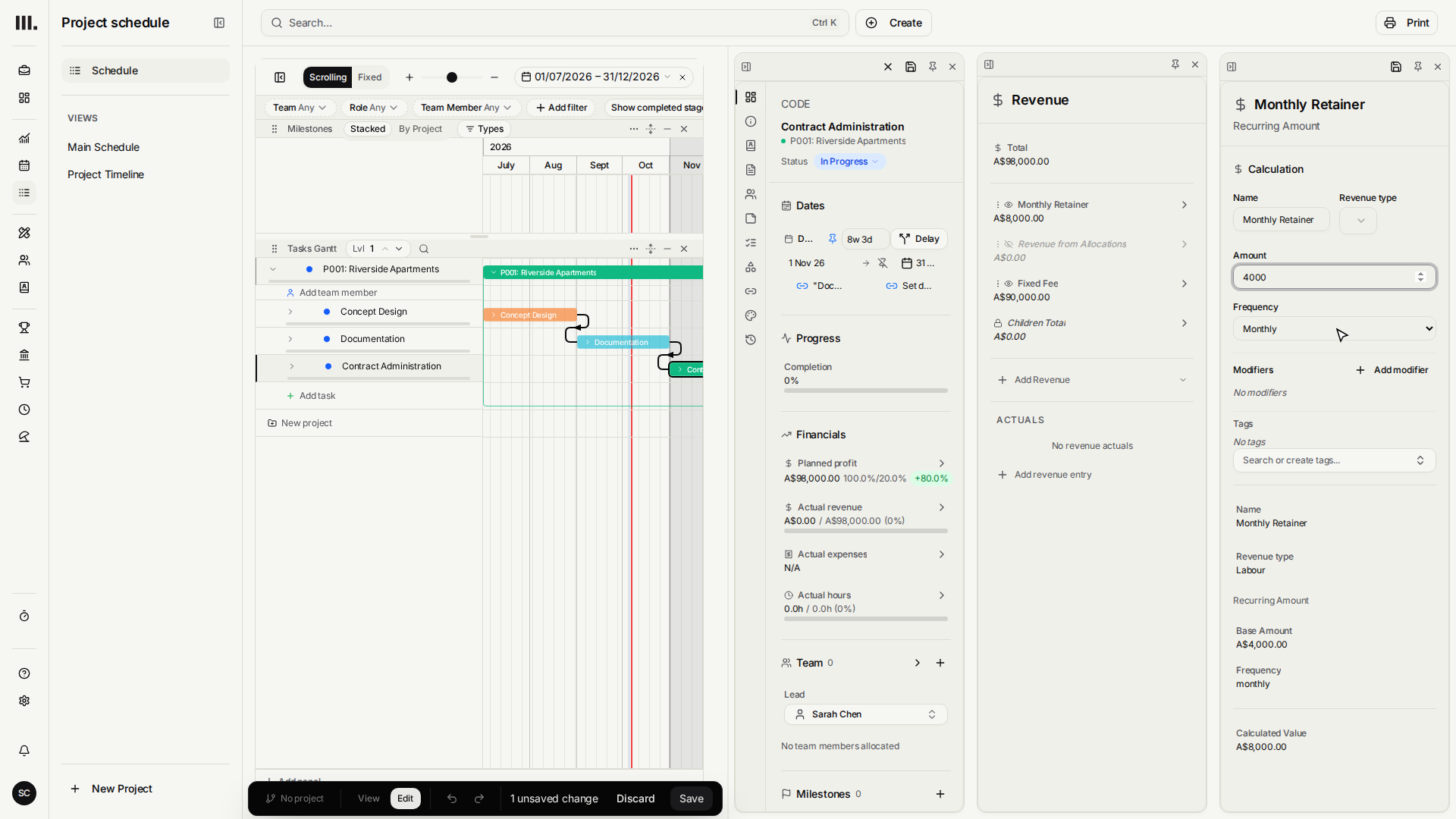
Name it Monthly Retainer and set the Amount to four thousand dollars.
- 4
Set the Frequency to Monthly. November and December are two periods, so the total is eight thousand dollars.
- 5
Drag the stage end through February. Four monthly periods raise the total to sixteen thousand dollars.
- 6
Click Undo to restore the December end and eight thousand dollar total, then save the original programme.
Duration is what actually drives the total
Here's the real payoff. Because the interval count is read straight from the dates, the total responds to the programme automatically. Contract Administration currently runs November and December of 2026, two months, so the retainer totals eight thousand dollars right now. Drag the end of that bar out by two more months and it recalculates to four intervals, sixteen thousand dollars, without anyone touching the amount. Pull the bar back in and the total falls again just as automatically.
A recurring fee is only ever as accurate as the stage's span. If a total looks wrong, check the task's start and end dates first, the interval count is nothing more than arithmetic on those two numbers.
Troubleshooting
- The total reads as amount times one. A stage with no real date range yet only gives Monument a single interval to count. Give the stage its proper start and end and the count fills in correctly.
- The count is one off from what was expected. Both the start day and the end day count toward the total, so a range can include one more period than intuition suggests. Trim a day at the boundary if the count reads one too high.
- A recurring fee and a visible hours-based fee are both counting. If the retainer is meant to replace time-based revenue rather than add to it, hide the From Allocations item so the stage isn't earning both at once. See how Monument models finance.
Where this fits next
Recurring fees sit alongside the other revenue sources available per stage: the default revenue from resourcing, a flat fixed fee, or a formula. To adjust a recurring fee with a discount or a cap, layer on modifiers.
Related articles
Search Monument help
Search help articles and open a result.