
Browse articles
- Getting started
- Start your first project
- Model your project
- Critical path and automatic dates
- Read and rebalance the swimlanes
- Get oriented on the schedule
- Going further
- Give overhead a home with admin projects
- Structure large projects
- Baselines and versions
- Change Gantt bar colours
- Set a revenue target on the schedule
- Getting started
- How Monument models finance
- Revenue from resourcing
- Fixed fees
- Budgeting costs
- Recording expenses
- Recording revenue entries
- Going further
- Formula based pricing and construction cost
- Recurring and periodic fees
- Revenue from expenses
- Modifiers: contingencies and discounts
- Progressive billing
- Pricing templates
- Operational expenses
- Getting started
- Read your Dashboard
- Build a custom report
- Edit a saved report
- Filter a report
- Formula columns
- Freeze a report into a snapshot
- Reports on a project
- Definitions: how each figure is worked out
- Going further
- Time-Series Columns
- Organise your work with tags
- Break reports and accounting down by office
- Control access to business finances
- Control access to rates
- Control who can create projects
- Control project administration
- Control staff and team management
- Control expenses and claims
- Control report definition editing
- Control access to contacts
- Give full project control with Owner
- Manage project work without changing money
- Let project members edit tasks safely
- Share a project safely with Viewer
- Let a team lead coordinate shared work
- Share teammate profiles without management access
- Keep team members focused on their own work
Group people into teams
Build a team of staff you can assign, rate, and permission as one, so you can plan a project's load before you've decided exactly who does the work.
What you'll achieve
Create a team with members and default rates so you can staff a stage by capacity now and swap named people in later, while the schedule tracks the team's shared availability.
You'll end up with: A working team, say Studio One, with members, default rates, and shared capacity the schedule can draw down.
Before you start
When you plan a project you rarely think "I need Sarah Chen for this stage"; you think "I need an architect's worth of capacity." A team lets you plan in exactly those terms: a named group of people you treat as one for assigning work, applying rates, and granting permissions.
We'll build the Studio One team for Northlight Architects, put Priya Sharma in it, give it default rates, and use it to staff Riverside Apartments before the final cast is decided.
How Monument thinks about a team
Two ideas make teams worth using.
A team has shared capacity. A team's available hours are the sum of its members' available hours. So when you assign work to the Studio One team, you're drawing down that shared total, not any one person's week. Book the team heavily and you can spend everyone's spare capacity at once, which is why a whole team lane can turn red on the schedule even when no individual looks maxed out. That's the team telling you the truth: you've planned more work than the group actually has hands for. You read and rebalance that in the resource swimlanes.
Plan with a team now, swap a person in later. Assign the Studio One team to Concept Design today, while you still don't know who'll run it. The stage gets realistic hours, cost, and revenue immediately. When the team firms up, plan with the Architect role, then hand the work to a named person without redoing the numbers. The team is a placeholder with real capacity behind it.
A team can provide default rates, and each project membership can carry a project access level. A resource inherits team rates only when their rate source points at that team; access levels are assigned per membership, not once for every team member.
Create the team
Create the team with a name and description. Add its people after saving.
- 1
Create a new team and name it Studio One. Add a short description so colleagues know what it's for.
- 2
Teams use direct membership. This dialog only needs the team name and description.
- 3
Click Create team, then open Studio One and click Edit.
Add members and set default rates
Open the team and fill it out. You can add existing staff or create a new person inline without leaving the panel.
- 1
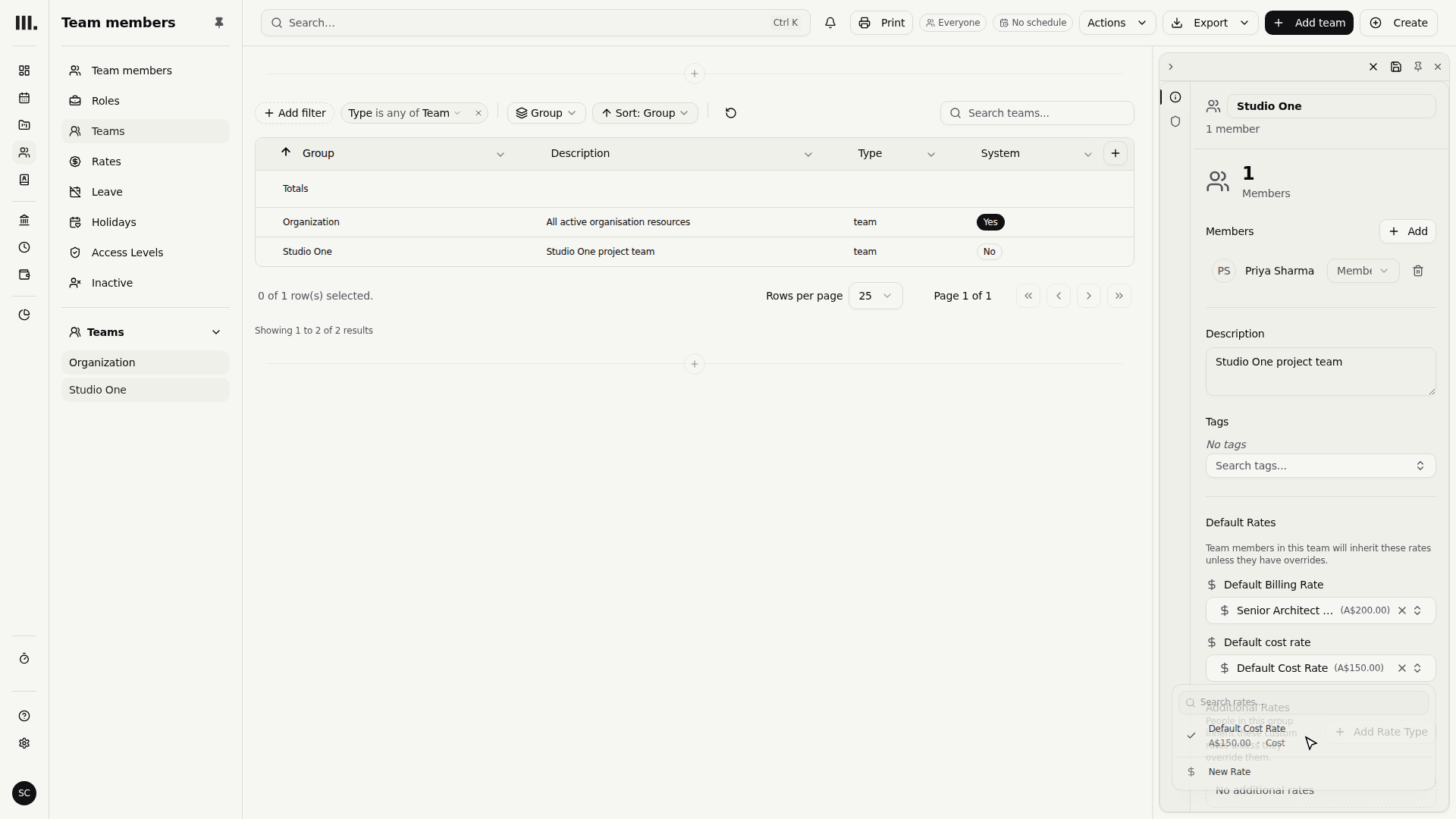
In the team's Members section, click Add and search for Priya Sharma. Not on file yet? Create the staff member right from the search and they're added when saved.
- 2
Set the Default Billing Rate to Senior Architect Charge-out, two hundred dollars an hour, and the Default Cost Rate to Cost rate, one hundred and fifty.
- 3
Click Save Changes to persist Studio One with Priya Sharma and its two rate defaults.
These two rates can price an unassigned Architect role booked against this team. A named resource uses the team's defaults only when their rate source is set to inherit from it; team membership alone does not apply those rates.
Use the team on the schedule
The payoff is in planning. On Riverside Apartments, assign the Studio One team to a stage instead of a named person. The stage draws on the team's shared capacity, and the team's lane on the schedule fills toward its combined line. Later, hand part of the work to Priya Sharma or another member, and the hours move from shared to named while the forecast holds.
Troubleshooting
- The team lane is red but every member looks fine. Capacity is shared. Several stages drawing on the same team add up against the combined total, so the team tips over before any one person does. Spread the work out or pull some onto named people with room; see balance capacity in the swimlanes.
- A member isn't picking up the team's rate. They have an override, or aren't set to inherit from this team. Open the person and switch them back to inheriting, or clear the override. Rates live in rates and rate history.
- There's a default team you didn't create. Organisations come with a default "Organization" team so rates and permissions have somewhere to live from day one. You can use it as-is or build your own alongside it.
Where this fits next
Your team can now stand in for real people while respecting how many hands you have. From here:
- Make the team's money right with rates and rate history.
- Keep its shared capacity honest as members take time off with leave and holidays.
- Plan and rebalance the team's load on the Gantt with balance capacity in the swimlanes.
Search Monument help
Search help articles and open a result.