
Browse articles
- Getting started
- Start your first project
- Model your project
- Critical path and automatic dates
- Read and rebalance the swimlanes
- Get oriented on the schedule
- Going further
- Give overhead a home with admin projects
- Structure large projects
- Baselines and versions
- Change Gantt bar colours
- Set a revenue target on the schedule
- Getting started
- How Monument models finance
- Revenue from resourcing
- Fixed fees
- Budgeting costs
- Recording expenses
- Recording revenue entries
- Going further
- Formula based pricing and construction cost
- Recurring and periodic fees
- Revenue from expenses
- Modifiers: contingencies and discounts
- Progressive billing
- Pricing templates
- Operational expenses
- Getting started
- Read your Dashboard
- Build a custom report
- Edit a saved report
- Filter a report
- Formula columns
- Freeze a report into a snapshot
- Reports on a project
- Definitions: how each figure is worked out
- Going further
- Time-Series Columns
- Organise your work with tags
- Break reports and accounting down by office
- Control access to business finances
- Control access to rates
- Control who can create projects
- Control project administration
- Control staff and team management
- Control expenses and claims
- Control report definition editing
- Control access to contacts
- Give full project control with Owner
- Manage project work without changing money
- Let project members edit tasks safely
- Share a project safely with Viewer
- Let a team lead coordinate shared work
- Share teammate profiles without management access
- Keep team members focused on their own work
Hand role work to staff
Assign one week of an open role booking to a real person without disturbing the rest, and choose whether the work prices from the role or from them.
What you'll achieve
Hand one week of open Architect role work to Sarah Chen, keep the role and track through the hand-out, and read the rate Monument stamps onto the week she takes.
You'll end up with: One week of the Documentation stage held by Sarah Chen, with the Architect role and track retained and Sarah's rate stamped onto the week as it commits.
Before you start
An open role booking is a plan, not a finished one. Sooner or later a real person picks up part of it, and Monument lets you hand over exactly the slice they're doing, no more, while the rest of the role's work stays open behind them.
We'll pick up where plan with roles and tracks left off: the Documentation stage on Riverside Apartments is booked against the Architect role, and we'll give Sarah Chen one week of it.
The idea: a handoff, not a replacement
Assigning a person to part of an open role booking splits it rather than replacing it. The week you hand over becomes Sarah's; the weeks either side stay open on the Architect role, untouched. The role and its track carry through the split on all three pieces, so the plan's shape survives even as names arrive piece by piece.
That split also raises a real pricing question: does Sarah's week bill at the rate the plan was priced on, or at her own rate? Monument doesn't guess. A Rate source switch appears the moment a booking carries both a retained role and an assigned person, and you choose.
Split one week to a person
Work from the timeline, on the same open Architect booking you created earlier.
- 1
Click Edit with Documentation open, ready to split off one week.
- 2
Double-click the week of September 14th on the Architect bar to select only that period.
- 3
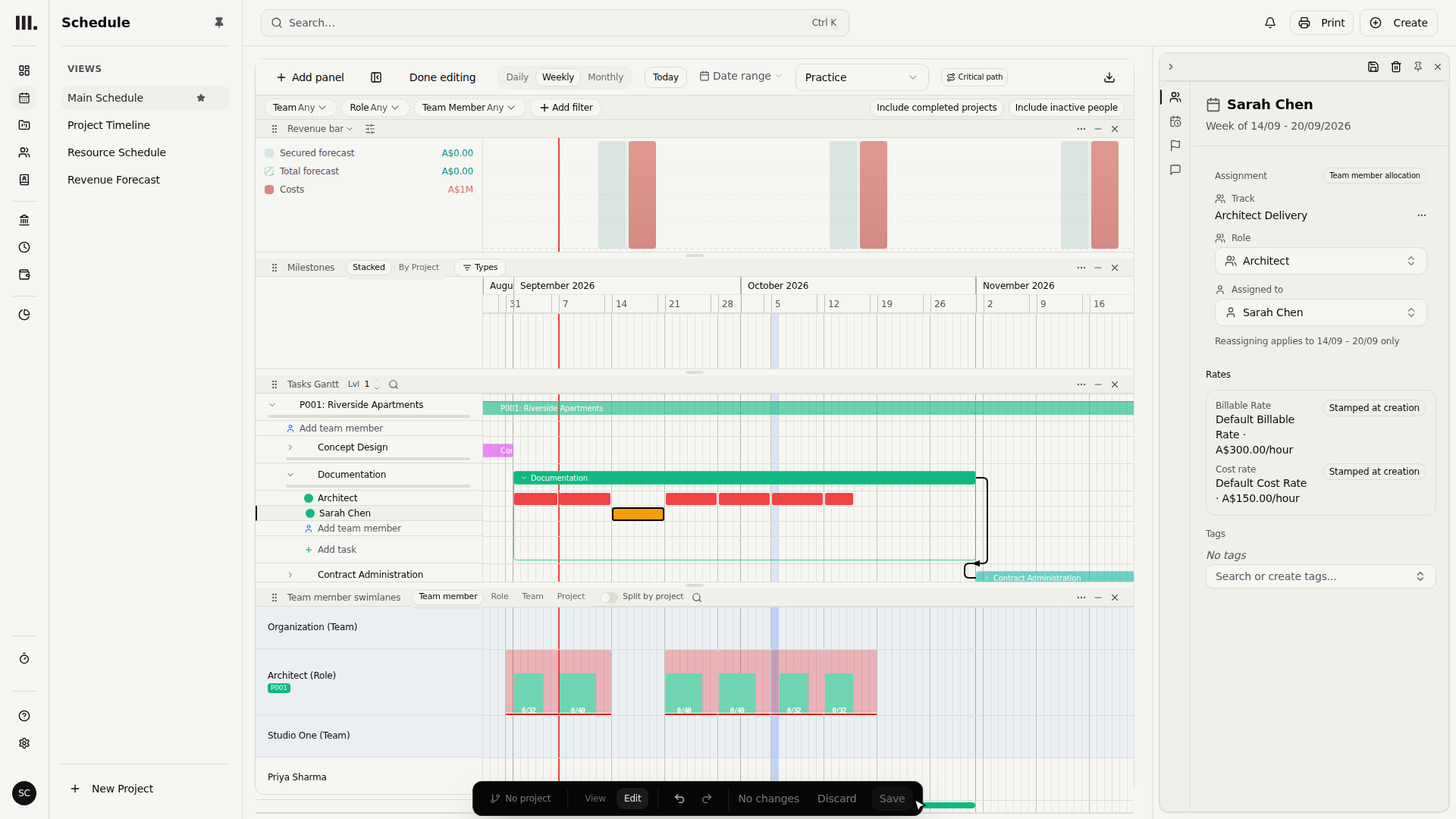
Choose Sarah Chen in Assigned to. That week becomes hers; the rest stays open Architect work.

Double-clicking a single week, rather than opening the whole booking, tells Monument to split only that period off. The Architect role keeps the weeks before and after, still unassigned and still forecasting on the group's rates.
Confirm what stayed
Open Sarah's new segment and check that the role and track came with it.
- 1
Role still reads Architect, and Track still reads Architect Delivery: the split kept both intact.

Choose the rate source
With both a role and a person on the same week, a Rate source switch appears. Leave it on the role to keep pricing the week as planned; flip it to Sarah Chen to price at what she's actually paid.
- 1
Rate source reads Role rates. Billable Rate is two hundred dollars an hour, Cost Rate one hundred and fifty.
- 2
Flip Rate source to Sarah Chen's rates: Billable Rate jumps to three hundred dollars an hour.
- 3
Switch Rate source back to Role rates, restoring the two hundred dollar plan already agreed for this week.
Role rates keep the commercial plan the stage was originally priced on, useful when the fee was quoted against the discipline rather than a name. Switching to the person's rates prices the week at what that individual actually costs and bills, useful when their rate genuinely differs from the plan. Neither is more correct; pick the one that matches the deal you made.
Save the split
- 1
Click Save to commit Sarah's week alongside the two open Architect segments either side.
Troubleshooting
- No Rate source switch appears. It only shows once a booking has both a retained role and an assigned person. A role-only or person-only booking prices from a single source and needs no switch.
- Assigning the week showed an over-allocation warning that shouldn't be there. The split keeps the allocation's planned hours for that week; it does not automatically change them to Sarah's normal hours. If the warning persists after saving, compare those planned hours with her capacity and other bookings for the same days.
- The rate switched but you didn't mean it to. Rate source is sticky per booking. If a week looks priced at the wrong rate, open it and check which side the switch is on before assuming the numbers are wrong.
- You wanted to hand over the whole booking, not one week. Select the full period instead of double-clicking a single week, and the entire role booking reassigns to the person with no split needed.
Where this fits next
You've handed one week of role work to a real person, kept the role and track through the split, and chosen which rate prices it. That choice has a direct financial consequence: see how it feeds the stage's fee in revenue from resourcing. To check nobody, role or person, is over-committed once more names land, use the resource swimlanes.
Search Monument help
Search help articles and open a result.