
Browse articles
- Getting started
- Start your first project
- Model your project
- Critical path and automatic dates
- Read and rebalance the swimlanes
- Get oriented on the schedule
- Going further
- Give overhead a home with admin projects
- Structure large projects
- Baselines and versions
- Change Gantt bar colours
- Set a revenue target on the schedule
- Getting started
- How Monument models finance
- Revenue from resourcing
- Fixed fees
- Budgeting costs
- Recording expenses
- Recording revenue entries
- Going further
- Formula based pricing and construction cost
- Recurring and periodic fees
- Revenue from expenses
- Modifiers: contingencies and discounts
- Progressive billing
- Pricing templates
- Operational expenses
- Getting started
- Read your Dashboard
- Build a custom report
- Edit a saved report
- Filter a report
- Formula columns
- Freeze a report into a snapshot
- Reports on a project
- Definitions: how each figure is worked out
- Going further
- Time-Series Columns
- Organise your work with tags
- Break reports and accounting down by office
- Control access to business finances
- Control access to rates
- Control who can create projects
- Control project administration
- Control staff and team management
- Control expenses and claims
- Control report definition editing
- Control access to contacts
- Give full project control with Owner
- Manage project work without changing money
- Let project members edit tasks safely
- Share a project safely with Viewer
- Let a team lead coordinate shared work
- Share teammate profiles without management access
- Keep team members focused on their own work
Grant access to one project
Give one person a deliberate project access level, then preview exactly what that grant allows.
What you'll achieve
Grant a person access to one project and verify the result before they begin work.
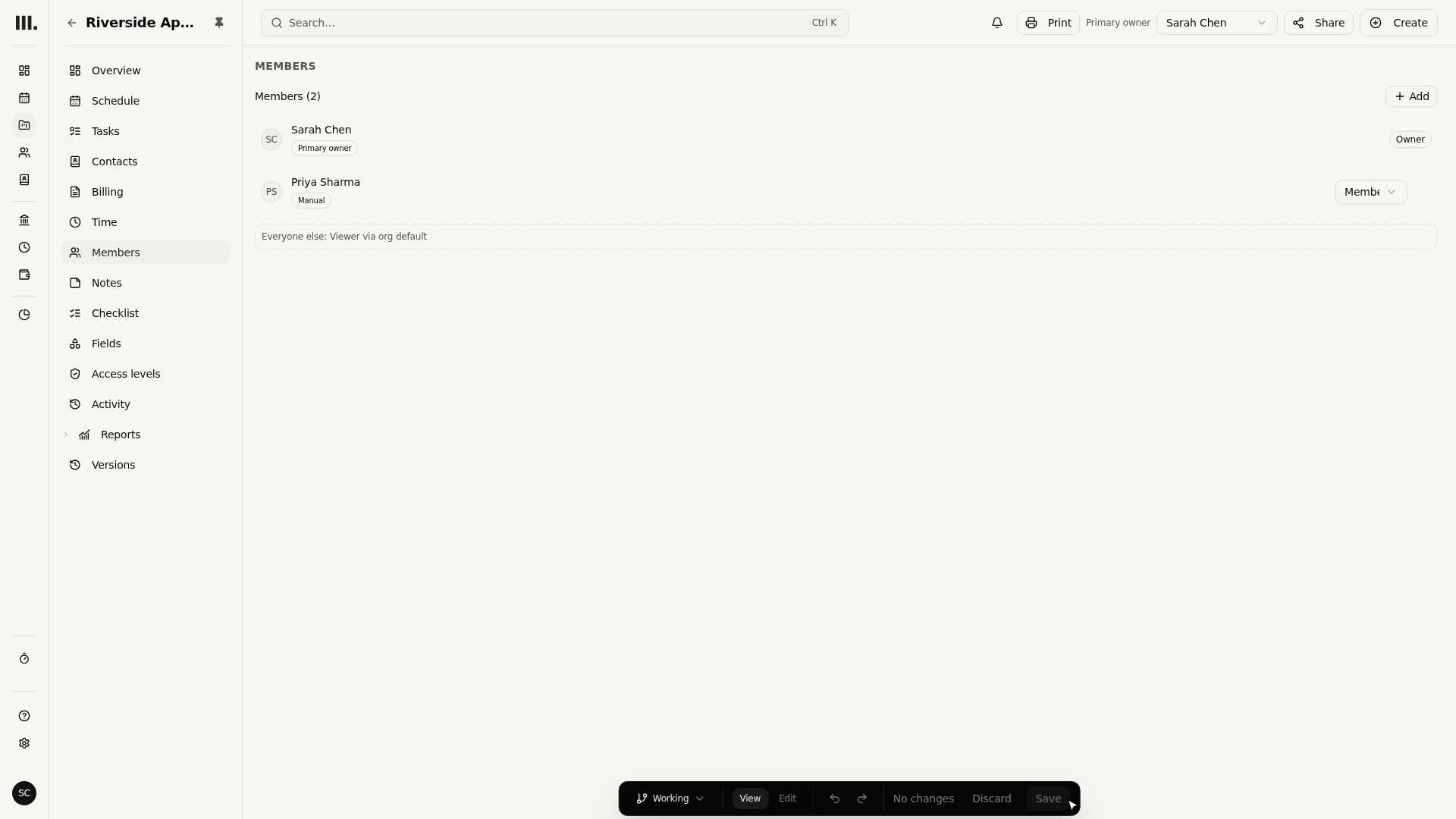
You'll end up with: Priya Sharma has a manual Member grant on Riverside Apartments and can edit its tasks without seeing project money.
Before you start
A project grant answers two questions
Project row admission and project capability are related, but they are not the same. A person first needs a reason to enter a project. Once admitted, their project access level decides what they can do with Revenue, Expenses, Tasks, Resources, and Time.
The Members tab creates the most deliberate kind of access: a manual grant. Manual wins over ownership, matching rules, allocations, and the all-project Viewer floor at the same task. The row is labelled Manual so an administrator can see that provenance later.
Assign Member to Priya Sharma
The example keeps Priya Sharma on the Contributor account level. Contributor does not grant firm-wide project administration, so the result comes from the Riverside Apartments grant.
- 1
Open Priya Sharma's Access tab and save Contributor.
- 2
Open Riverside Apartments, choose Members, and add Priya Sharma.
- 3
Choose Member, then click Save to keep this manual grant.
- 4
Return to Staff and start Preview for Priya Sharma.
- 5
Open Riverside Apartments from Schedule and confirm Revenue and Expenses are absent while task editing remains available.
You can also manage project access from the schedule item panel's Access levels tab. Members is the clearest path for a named person because it shows both the selected level and its provenance.
Preview uses Priya Sharma's server-resolved permissions for reads and blocks every mutation. Stop Preview before making another administrative change.
What Member means
Member sets Revenue and Expenses to Hidden, Tasks to Edit, and Resources and Time to View. Hidden money is absent or rendered as an em dash. It is never replaced with a zero amount.
Troubleshooting
- Priya cannot see Riverside Apartments. Confirm her row is present on Members and labelled Manual.
- Money is visible unexpectedly. Check the selected project level and whether another manual grant applies higher in the project tree.
- A removed grant seems to remain. Ownership, a matching people rule, an allocation, or the all-project Viewer floor may still admit the person.
Where this fits next
Compare the exact built-ins, starting with Owner, or use Member for the focused delivery-level example.
Search Monument help
Search help articles and open a result.