
Browse articles
- Getting started
- How Monument models finance
- Revenue from resourcing
- Fixed fees
- Budgeting costs
- Recording expenses
- Recording revenue entries
- Going further
- Formula based pricing and construction cost
- Recurring and periodic fees
- Revenue from expenses
- Modifiers: contingencies and discounts
- Progressive billing
- Pricing templates
- Operational expenses
- Control access to business finances
- Control access to rates
- Control who can create projects
- Control project administration
- Control staff and team management
- Control expenses and claims
- Control report definition editing
- Control access to contacts
- Give full project control with Owner
- Manage project work without changing money
- Let project members edit tasks safely
- Share a project safely with Viewer
- Let a team lead coordinate shared work
- Share teammate profiles without management access
- Keep team members focused on their own work
Creating milestones and planning revenue
Place billable milestones directly on the schedule to connect agreed billing events with delivery dates, planned revenue, and draft invoices.
What you'll achieve
Plan when a project's revenue lands by placing billable milestones on its stages, and have Monument draft the invoices automatically.
You'll end up with: Two billable milestones sitting on the timeline, each with a draft invoice drawn from its stage's revenue.
Before you start
A milestone can carry an agreed billing event
Pricing tells you what a project earns. Milestones connect revenue to dates agreed for this particular commission, such as a deposit, monthly claim, approval, or deliverable. A practice does not have to bill at the end of every stage. The milestone pattern should match the fee agreement, and a billable milestone can prepare the corresponding draft invoice.
Sarah Chen at Northlight Architects is planning two agreed billing events for Riverside Apartments. Rather than keep a separate spreadsheet of what to bill when, she puts both directly on the schedule.
Line up the whole project's income by placing milestones stage by stage
A project's income profile is just its milestones laid end to end: this much revenue by here, that much by there. Because each milestone reads directly from the stage's own live calculation, there's no re-keying a number anywhere, and no separate document to keep in sync with the schedule. Milestones on the same stage also net against each other, so claiming revenue at one sign-off means the next milestone on that stage only bills what's left.
- 1
Click Edit, expand Riverside Apartments, and select the project so its milestone timeline is available.
- 2
Click the timeline at the agreed Concept Design billing date. Name the milestone Concept Design Sign-off.
- 3
Turn on Create Draft Invoice so this billing event prepares a draft from live revenue.
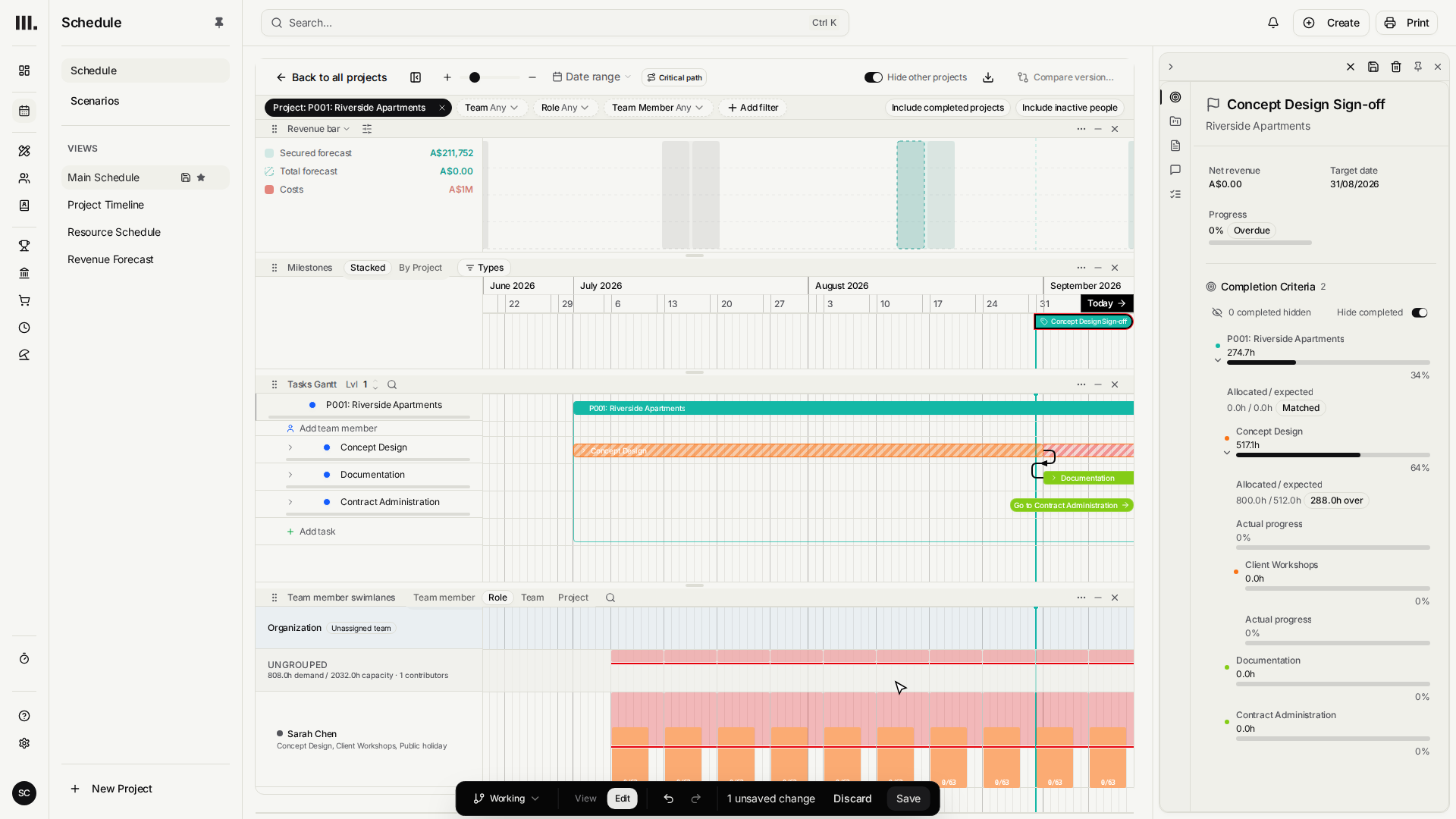
Repeat exactly that for the next deliverable in the programme.
- 1
Back in the project panel, add a second milestone and name it Documentation Issued.
- 2
Make this milestone billable too, giving the revenue plan a second instalment.
- 3
Click Save to create the second billing milestone. Both agreed billing events now sit alongside the delivery plan.

Not every milestone needs to bill anything, some just mark progress or a hand-off with no payment attached. The Billable switch is the difference: turn it on and a draft invoice appears immediately, leave it off and the milestone stays a pure planning marker on the timeline.
The schedule and the income forecast are the same document
This is the real shift milestones bring: once they're in place, moving the schedule moves the money plan with it. Drag a stage's dates and its milestone moves along the timeline. Change the resourcing behind a stage and its milestone's draft invoice recalculates to match. There's no second plan to remember to update, the timeline already is the income forecast.
Troubleshooting
- A billable milestone with no revenue behind it drafts an empty invoice. Confirm the stage it sits on actually has revenue, from allocations or a fee, before switching Billable on.
- Moving a stage moves its milestone with it. That's intentional, but it's worth checking the new billing date still works for the client after a reschedule.
- A later milestone on the same stage bills only what's left. Monument nets each billing point against earlier ones on the same work automatically, so nothing gets billed twice.
- A draft invoice is still just a draft. Nothing reaches the client until someone opens it in Invoicing and sends it. Milestones plan the bill, they don't send it.
Where this fits next
With both milestones drafting invoices from live revenue, the plan for the work and the plan for the income are now one and the same. Each draft sits waiting in Invoicing, ready to review and send the moment its stage of work is actually delivered.
Search Monument help
Search help articles and open a result.