
Browse articles
- Getting started
- How Monument models finance
- Revenue from resourcing
- Fixed fees
- Budgeting costs
- Recording expenses
- Recording revenue entries
- Going further
- Formula based pricing and construction cost
- Recurring and periodic fees
- Revenue from expenses
- Modifiers: contingencies and discounts
- Progressive billing
- Pricing templates
- Operational expenses
- Control access to business finances
- Control access to rates
- Control who can create projects
- Control project administration
- Control staff and team management
- Control expenses and claims
- Control report definition editing
- Control access to contacts
- Give full project control with Owner
- Manage project work without changing money
- Let project members edit tasks safely
- Share a project safely with Viewer
- Let a team lead coordinate shared work
- Share teammate profiles without management access
- Keep team members focused on their own work
Fixed fees
Hide the hours-based revenue a stage earns by default and replace it with an agreed lump sum, without losing the ability to check your margin against it.
What you'll achieve
Price a stage as a fixed fee instead of letting its revenue follow the hours.
You'll end up with: A stage that earns a fixed fee, with the hourly calculation still sitting there hidden as a margin check.
Before you start
Left alone, a stage earns exactly what its people earn: hours allocated to it, multiplied by their charge-out rates, add straight into revenue. That's the right answer for time-and-materials work. It's the wrong answer the moment a client has agreed to pay a fixed fee, a flat number that isn't supposed to move just because the hours did.
Here's how to price the Concept Design stage of Riverside Apartments as a fixed fee instead of an hourly one.
Revenue is a list you can rearrange, not a locked figure
Nothing about a stage's revenue is hard-wired to hours. Revenue is a list of items, and the hours-based number is simply the first item Monument put on that list for you. Swapping to a fixed fee only takes two moves:
- Hide the item that's calculating revenue from allocations, so it drops out of the total.
- Add a new item, a fixed amount, for the number the client actually agreed to.
Hiding is not deleting. The hidden item keeps calculating in the background, it's just excluded from the sum, which is exactly what makes it useful a moment from now.
Swap the calculated revenue for a fixed one
- 1
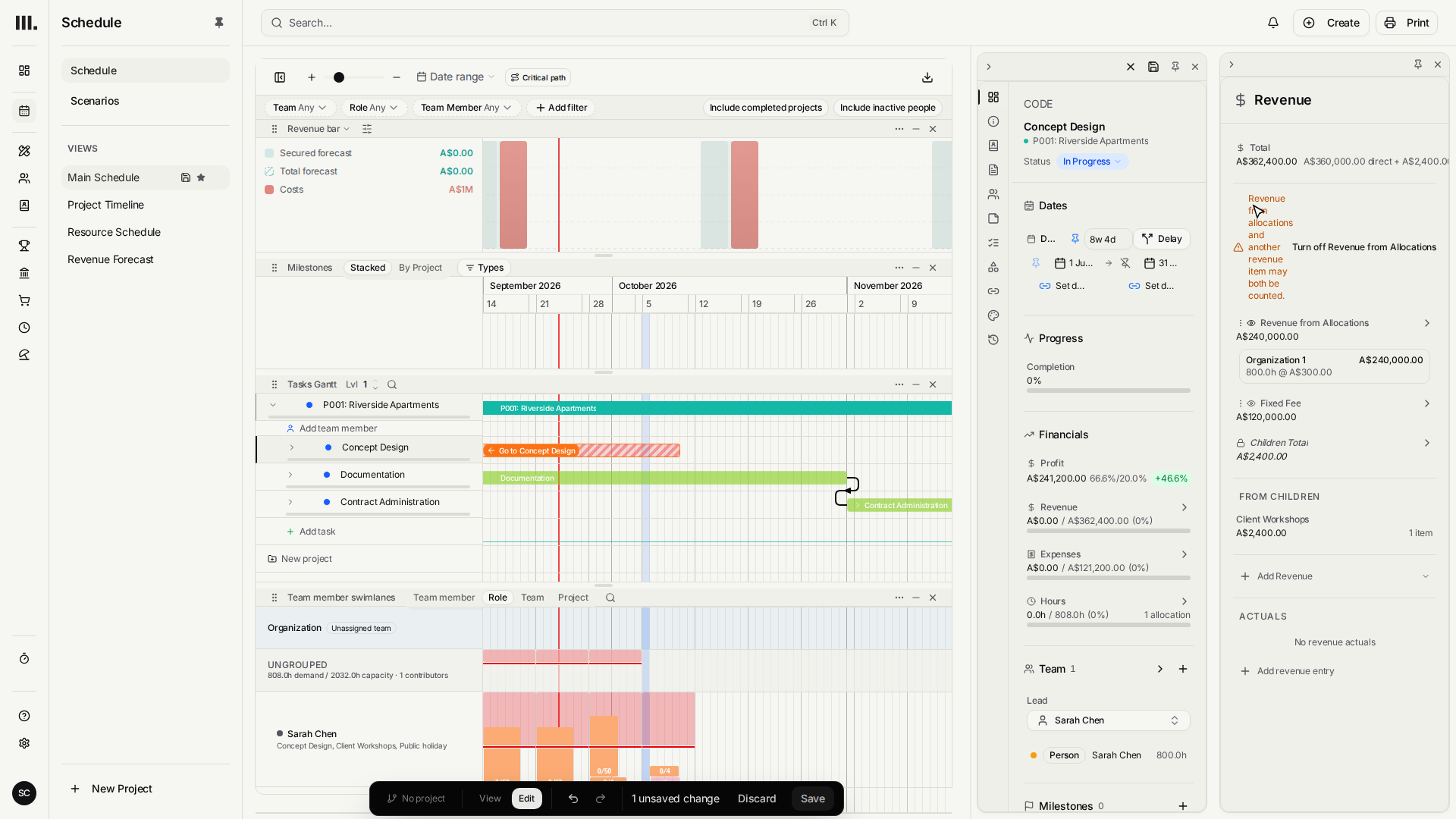
Open the Concept Design stage and its Revenue breakdown.
- 2
Hide the calculated, allocation-based revenue item using its visibility toggle.
- 3
Add a new revenue item and choose Fixed Amount.
- 4
Name it Fixed Fee and set the amount to two hundred thousand dollars.
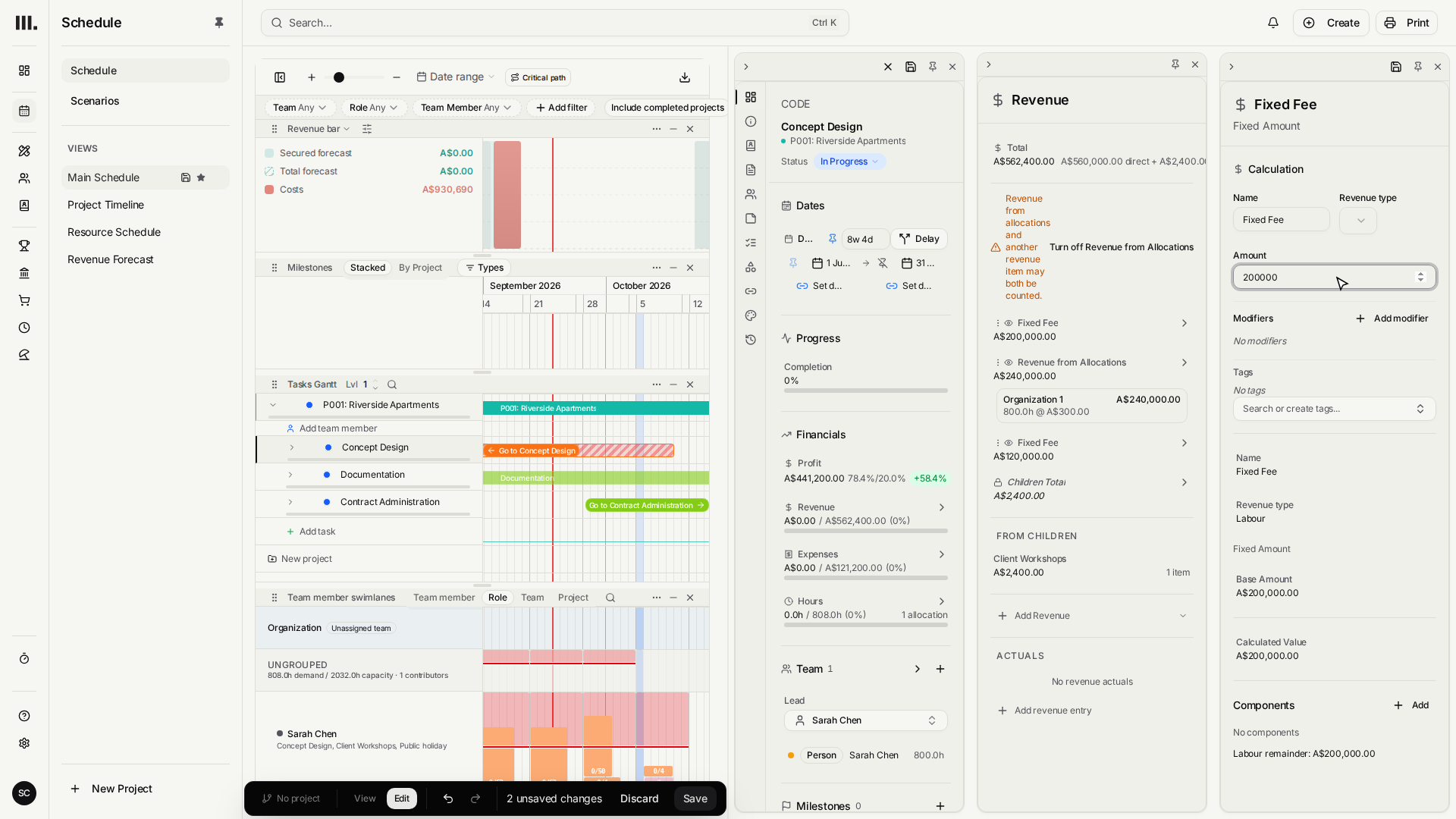
A hidden item is a live comparison, not dead weight. With the calculated revenue still sitting there, greyed out, you can glance at what the stage would have earned hourly and see immediately whether the fixed fee is ahead of that pace or falling behind it.
A fixed fee turns resourcing into the lever
Once revenue is fixed, it stops being the variable. Profit is now whatever's left after you deliver the work, so the fixed amount sets a ceiling and your resourcing decides how much of it you keep: put fewer senior hours against the stage, tighten the allocation, or change who's doing the work, and margin responds directly.
That's the real shift a fixed fee makes. The question stops being "what will this earn" and becomes "what can we deliver this for."
Troubleshooting
- Hiding the item didn't move the total. Hiding only removes what was actually counted. A stage with no allocations yet had nothing in that item to begin with.
- A fixed fee left next to a visible hourly item pays out twice. Adding the fixed amount doesn't automatically hide anything else. If both stay visible, the stage earns both.
- The fixed fee won't react to extra hours, and that's by design. Over-allocate the stage and revenue holds still; only cost, and therefore margin, moves.
Where this fits next
A flat fixed fee is the simplest override there is. Often the number you want isn't flat at all, it should be derived from something else, like a percentage of construction cost. That's what formula-based pricing covers next.
Search Monument help
Search help articles and open a result.