
Browse articles
- Getting started
- How Monument models finance
- Revenue from resourcing
- Fixed fees
- Budgeting costs
- Recording expenses
- Recording revenue entries
- Going further
- Formula based pricing and construction cost
- Recurring and periodic fees
- Revenue from expenses
- Modifiers: contingencies and discounts
- Progressive billing
- Pricing templates
- Operational expenses
- Control access to business finances
- Control access to rates
- Control who can create projects
- Control project administration
- Control staff and team management
- Control expenses and claims
- Control report definition editing
- Control access to contacts
- Give full project control with Owner
- Manage project work without changing money
- Let project members edit tasks safely
- Share a project safely with Viewer
- Let a team lead coordinate shared work
- Share teammate profiles without management access
- Keep team members focused on their own work
How Monument models finance
See the finance model behind every stage: revenue and expense lists, with profit as the gap between them.
What you'll achieve
Understand the single finance model every pricing feature in Monument is built from, before touching fixed fees, formulas, or recurring charges.
You'll end up with: A working mental model of items, calculation types, and profit as revenue minus expenses, so every other pricing article makes sense on first read.
Every number in Monument's financials, a fixed fee, a formula, a recurring retainer, a markup on a disbursement, is built from the same small shape. Learn that shape once and the rest of pricing stops looking like a list of separate features. It's one mechanism, applied a little differently each time.
We'll read it straight off Riverside Apartments, on its first stage, Concept Design.
A stage's finance is a list, not a number
Open a stage's financials and you won't find a single revenue figure sitting there waiting to be typed. You'll find a list of revenue items that sum to the total, and a separate list of expense items that sum to theirs. Every fee you'll ever add is one more line on one of those two lists.
Each item on the list answers two questions:
- Where does its value come from? That's the item's calculation type: a fixed amount you typed in, an amount that repeats on a schedule, hours multiplied by a rate, a markup on an expense, or a formula referencing other items.
- What happens to that value before it counts? That's the item's modifiers, optional adjustments layered on top, like a contingency, a discount, or a floor and cap.
Source, then adjustment. Once you can read one item that way, you can read every fee and cost in the product.
There's no separate revenue logic and expense logic. A From Allocations item is hours times a rate on both sides, the charge-out rate feeds revenue and the cost rate feeds expenses. Learn the mechanism once and both sides come for free.
Where an item's value comes from
Every item you add picks a calculation type from a grouped menu:
- Fixed Amount: a number you type once, an agreed lump sum. See fixed fees.
- Recurring Amount: a smaller amount that repeats across the stage's dates, like a monthly retainer. See recurring and periodic fees.
- From Allocations: hours times a rate. This is where revenue comes from by default, the moment you staff a stage, its revenue starts showing up on its own. See revenue from resourcing.
- From Expenses (revenue side only): bills disbursements back out at a markup or to a target profit. See revenue from expenses.
- Formula: an expression that reads other items, so one fee can be driven by another number, like a percentage of construction cost. See formula-based pricing.
You'll also come across a total you never create yourself: once a stage has child tasks, Monument totals them up automatically as a From Children line, purely so a parent's number always agrees with its parts.
Profit is read, never written
Because revenue and expenses are two separate lists, profit isn't a figure anyone enters. It's what's left over:
profit = revenue − expenses
Move a charge-out rate and revenue shifts. Put a more senior person on the stage and expenses shift. Profit tracks whatever is happening underneath it, nothing more. There's no profit field to fill in, only two lists to shape.
Items can be visible or hidden
Every item carries a visibility switch. A visible item counts toward the stage's total; a hidden one stays on the list, shown greyed out and italic, but drops out of the sum.
That's how you keep a figure around for reference without it billing anything. A common case: park a construction-cost number as a hidden item purely so a formula elsewhere can point at it, without that number itself inflating revenue. Formula based pricing and construction cost walks through exactly that setup.
A hidden item still calculates, it only stops counting toward the total. Turn on a fixed fee and hide the hours-based revenue it's replacing, and you can still glance at what the work would have earned billed by the hour. Delete that item instead and the comparison is gone for good.
A stage's own total versus its rollup
Projects, stages, and tasks form a tree, and money rolls upward through it.
- A stage's own total sums only its own visible items.
- Its rollup total adds everything its descendants contribute on top of that.
The breakdown shows both, something like "direct amount plus amount from children", so a stage can carry its own fee and still gather up whatever its tasks earn underneath, without the two blending together unreadably.
Read it on Riverside Apartments
- 1
Open the Concept Design stage and its financial model appears in the panel.
- 2
Read the Profit figure next to Revenue and Expenses.
- 3
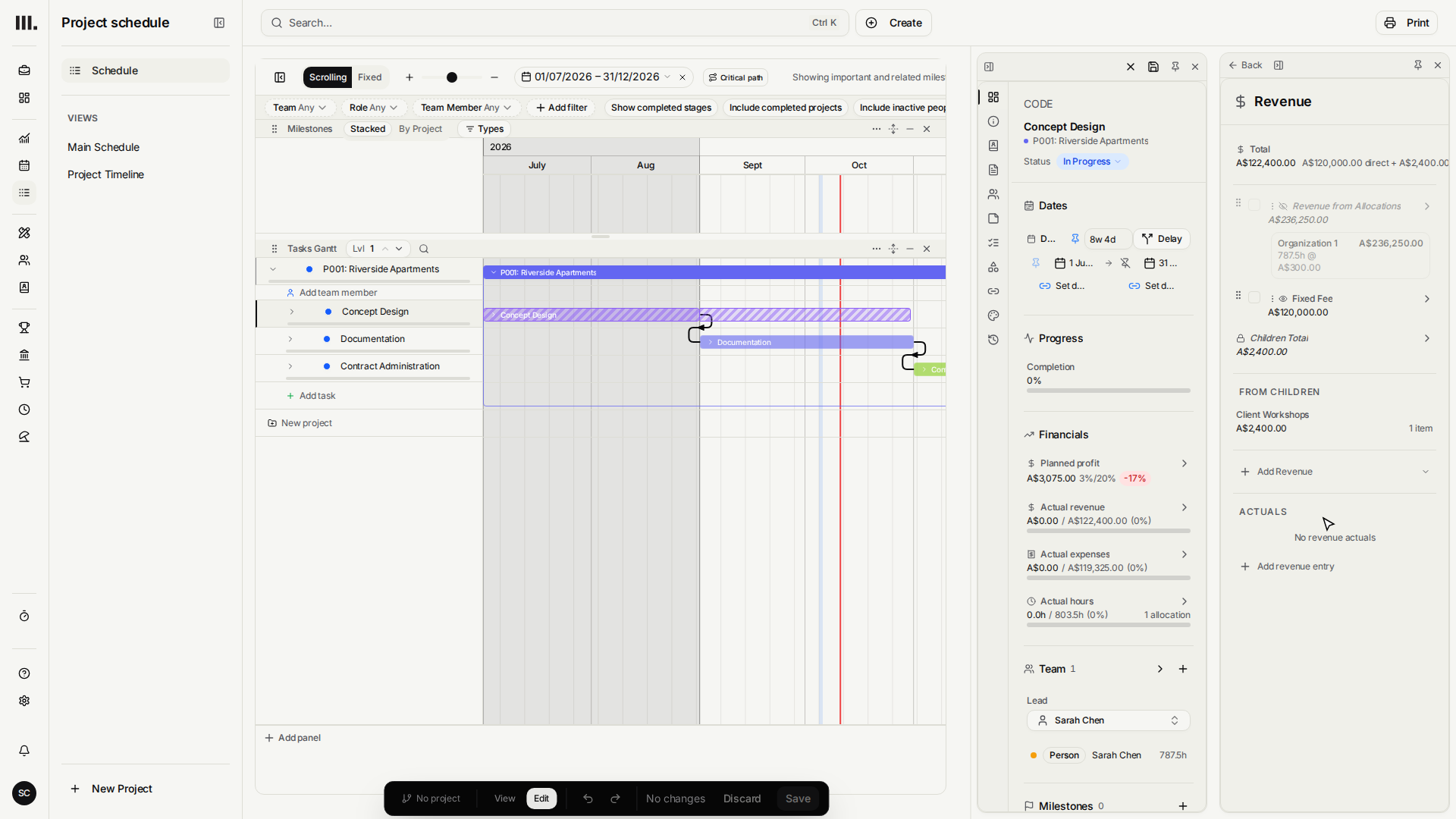
Click Revenue to open its breakdown into a list of items.
- 4
Find the From Allocations item: Organization 1's planned hours multiplied by its stamped charge-out rate in Australian dollars appear in the inline billing-group row.

- 5
Add a temporary Fixed Amount line, Illustrative Fixed Fee for ten thousand dollars. Revenue is a list because one stage can combine time-based fees, fixed fees, and even revenue recovered from expenses.
- 6
Delete the temporary line and save, leaving the stage clean. Fixed fees and expense recovery each have a dedicated tutorial.
- 7
Click Expenses and see the allocation hours again, this time priced at their cost rate.
Troubleshooting
- Hiding an item didn't change the total. Hiding only removes whatever that item was contributing. If it summed to zero already, say there was nothing allocated yet, there's nothing to subtract.
- Two visible items on the same thing double-counts it. A fixed fee left visible next to a visible From Allocations item means the stage earns both. When a new item replaces an old one, hide the one being replaced.
- A parent's total looks off until you know which number you're reading. Own total and rollup total are deliberately different figures. Check whether the panel is showing you the direct amount or the amount including children.
Where this fits next
Everything else in pricing hangs off this one shape. Start with the default source, revenue from resourcing, then move on to the overrides: fixed fees, recurring fees, revenue from expenses, formulas, and the adjustments that layer on top in modifiers, contingencies and discounts.
Search Monument help
Search help articles and open a result.